
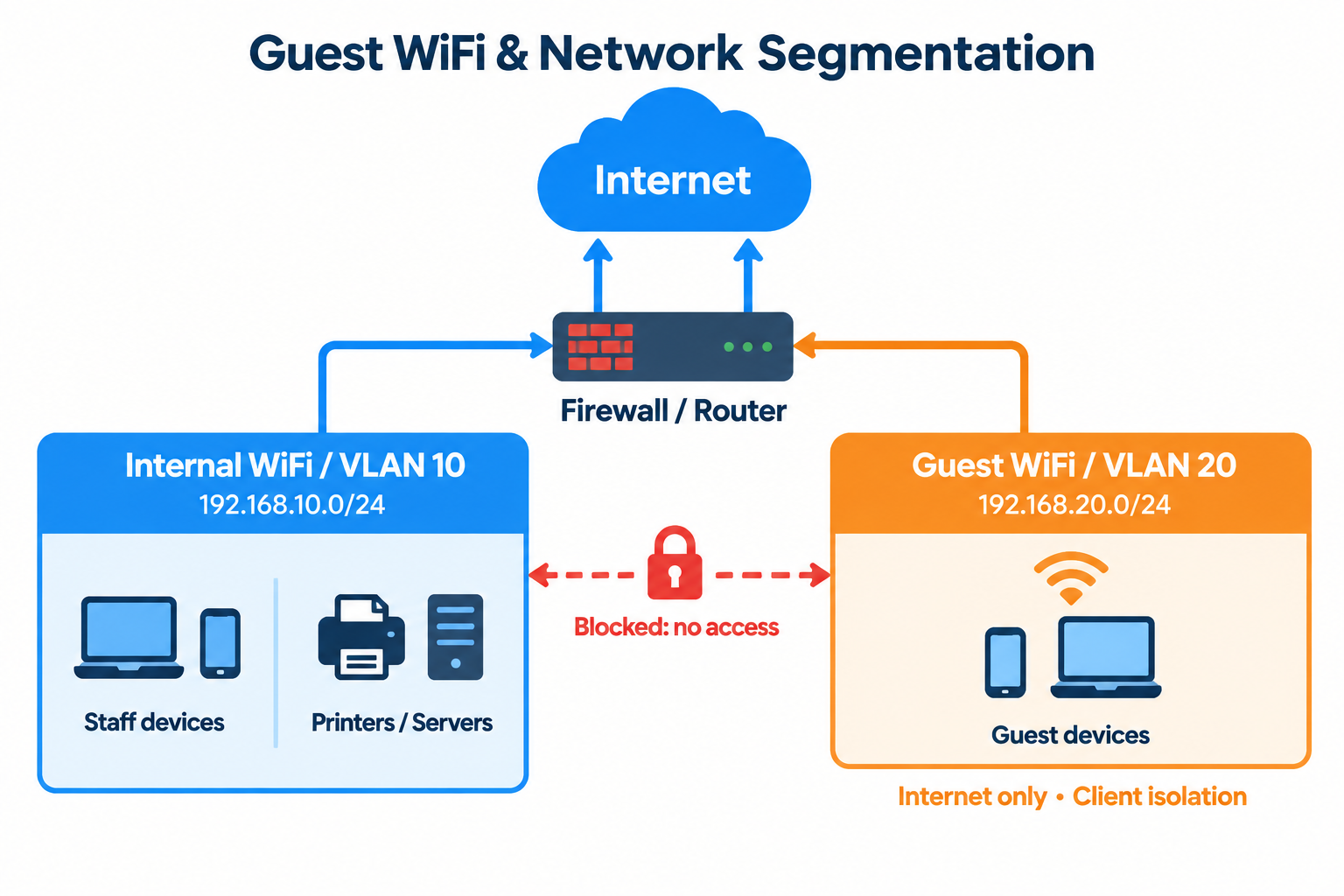
Why Guest Wi‑Fi Needs Strong Boundaries
Guest Wi‑Fi is essential for visitors, contractors, customers, and employees using personal devices. However, it must never offer the same access level as the organization’s trusted network. A misconfigured guest network can let a compromised or malicious device discover internal systems, reach shared resources, or exploit vulnerable equipment. The fix is to pair guest Wi‑Fi with network segmentation: separating devices and traffic into distinct, controlled zones.
What Network Segmentation Means
Network segmentation splits a network into smaller sections using VLANs, firewalls, and separate IP ranges. Each segment enforces its own security rules and access permissions.
A typical setup includes:
- Corporate network: managed laptops, servers, printers, business apps.
- Guest network: visitors’ phones, tablets, personal computers.
- IoT network: cameras, smart TVs, sensors, door controllers.
- Management network: switches, access points, firewalls, admin interfaces.
This limits how far an incident can spread. If a guest device is compromised, the attacker should remain confined to the guest segment.
How Guest Wi‑Fi Should Work
Guests should get internet access only—no access to internal resources. The guest SSID must map to a dedicated guest VLAN, with firewall policies that explicitly restrict traffic.
Allow at minimum:
– DHCP (IP address assignment).
– DNS (name resolution).
– Internet access via the organization’s firewall.
Block or restrict:
– Corporate computers and servers.
– File shares and internal applications.
– Printers and network storage.
– Network equipment and management interfaces.
Private/internal IP ranges
- Default stance: Deny all, with exceptions only for clear business needs.
- Client Isolation Adds Another Layer: Isolation should apply not just between guest and corporate networks, but also between guest devices. Client isolation (or peer‑to‑peer blocking) prevents one guest device from talking directly to another.
This matters because guests can’t know if other connected devices are trustworthy. Blocking device‑to‑device traffic reduces risks from file sharing, vulnerable services, malware scanning, or local device attacks.
Exceptions (e.g., a conference room presentation system) should be narrow—limited to specific devices and ports, not broad access.
Secure the Wireless Service
Segmentation is essential, but wireless security still matters:
- Use WPA2 or WPA3 encryption.
- Enforce strong credentials.
- Keep access points updated.
Change guest credentials periodically, especially when widely shared.
For larger or public environments, a captive portal can add controls such as:
- Terms-of-use acceptance.
- Individual or time‑limited credentials.
- SMS, email, or voucher‑based access.
- Usage limits and session expiry.
Basic session auditing.
A captive portal controls access to the Wi‑Fi service but does not replace firewall rules for isolating guest traffic from internal systems.
Protect Bandwidth and Availability
Guest users can consume significant bandwidth (streaming, updates, large downloads). Rate limiting and bandwidth controls prevent guest activity from impacting business operations.
Consider:
- Per‑device bandwidth limits.
- Separate internet connections for guests.
- Traffic prioritization for business apps.
- Timeouts for inactive devices.
- Monitoring for excessive or suspicious usage.
These controls improve both security and service quality.
Test the Design Regularly
Don’t just document the design—test it. Connect a test device to the guest SSID and verify it can browse the internet but cannot reach internal resources.
Useful checks:
- Confirm the device gets an IP from the guest range.
- Test access to internal servers, printers, file shares, admin pages.
- Check whether other guest devices are visible or reachable.
- Review firewall logs to confirm blocked traffic is denied.
- Test IPv6 as well as IPv4 (if enabled).
- Recheck after any firewall, wireless, or switch changes.
Periodic vulnerability assessments and configuration reviews catch accidental rule changes or newly exposed services.
Avoid Common Mistakes
These errors can undermine a well‑planned guest network:
- Separate SSID without a separate VLAN.
- Overly broad “any‑to‑any” firewall rules.
- Exposed printer, camera, or router management interfaces.
- Ignoring equivalent IPv6 restrictions.
- Same credentials for guest and corporate Wi‑Fi.
- Treating a captive portal as a security boundary.
- Failing to isolate guest devices from each other.
- Neglecting firmware updates on wireless and network gear.
Review the configuration whenever a new service, device, or access requirement is introduced.
The Core Principle
Treat guest Wi‑Fi as an untrusted environment. Visitors need reliable internet, not visibility into internal infrastructure. By combining separate VLANs, restrictive firewall policies, client isolation, secure wireless settings, bandwidth controls, and regular testing, organizations can offer convenient connectivity while sharply reducing exposure to unauthorized access and malware.
If you need any help with the above or have any other questions, our vastly experienced network infrastructure solutions architects are here to assist.