

Cybersecurity threats are evolving every day, and one of the most notorious attack techniques is the Man-In-The-Middle (MITM) attack. This type of attack can compromise sensitive data without the victim even realizing it. Let us break down what MITM attacks are, how they work, and what you can do to protect yourself.
What is a Man-in-the-Middle Attack?
A Man-in-the-Middle attack is when an attacker intercepts communications between endpoints (clients and servers, or clients and clients), usually with the goal of:
- Eavesdropping on unencrypted data (credentials, PII, financial details).
- Session hijacking by stealing cookies or tokens to impersonate users.
- Manipulating content (injecting payloads, redirecting traffic, altering transactions).
- Credential harvesting via deceptive login pages or downgraded encryption.
In practice, a MITM can occur over Wi‑Fi, LAN, VPNs, or compromised routers, and at various layers including DNS, ARP, TLS/SSL, and application logic.
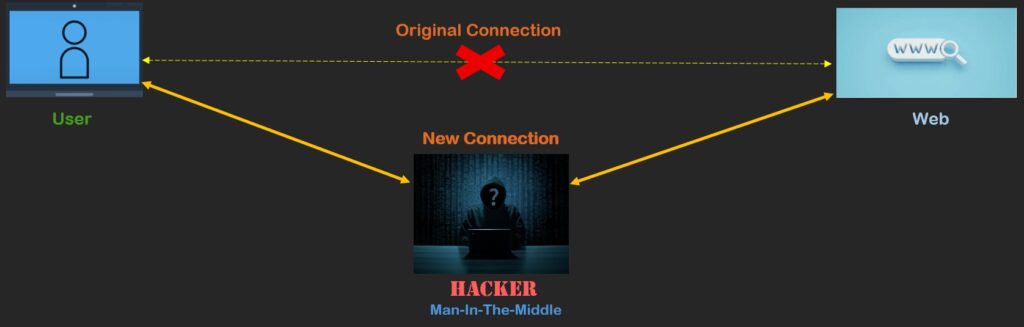
How Does an MITM Attack Work?
An MITM attack makes use of the following techniques:
1. Positioning: Gaining a Foothold in the Path
Attackers need to place themselves logically between the victim and destination:
- Rogue Access Points: An attacker sets up a Wi‑Fi network named “Free_WiFi” or mimics a known SSID. Users connect, and traffic flows through the attacker’s device.
- ARP Spoofing/Poisoning (LAN): On local networks, attackers send fake ARP responses to map the gateway’s IP to the attacker’s MAC address, diverting traffic through them.
- DNS Spoofing: By poisoning DNS cache or manipulating resolvers, attackers redirect users to malicious look‑alike domains.
- BGP/Route Hijacking (rare, but severe): At ISP or backbone level, malicious routing announcements can reroute traffic globally.
- Compromised Proxy or VPN: Misconfigured or malicious middle-boxes can inspect or alter traffic.
2. Decryption or Downgrade
Once positioned, attackers may seek to bypass encryption:
- SSL Stripping: Downgrade HTTPS to HTTP during the initial redirect flow so victims unknowingly use plaintext.
- Fake Certificates / TLS Interception: Use invalid or stolen certificates to intercept HTTPS; users who click through browser warnings are vulnerable.
- Weak Cipher Suites / Legacy Protocols: Exploit servers that still allow outdated TLS versions or vulnerable ciphers.
3. Data Capture and Manipulation
With traffic flowing through them, attackers can:
- Steal session cookies and replay them for account access.
- Collect credentials by proxying login pages.
- Inject scripts/content to perform ad fraud, crypto mining, or deliver malware.
- Modify transactions (e.g., payment account numbers, invoice PDFs, or wire instructions).
Common Types of MITM Attacks
- Wi‑Fi Eavesdropping: Attacker sets up “Your_Free_WiFi” at a café. User connects and logs into email; traffic is proxied, and login tokens are captured.
- HTTPS Downgrade (SSL Stripping): Victim browses to a site that auto‑redirects from HTTP to HTTPS. Attacker intercepts the redirect and keeps the session at HTTP.
- Session Hijacking: After login, the website issues a session cookie. Attacker copies the cookie and replays it to impersonate the user without knowing their password.
- DNS Poisoning: The attacker manipulates DNS responses so bank.example.com resolves to a malicious server hosting a pixel-perfect clone of the bank site.
- Email in the Middle: Business Email Compromise (BEC) actors sit between supplier and buyer by forwarding rules or compromised accounts, alter invoices and payment instructions.
Why is MITM Is So Effective
- Invisible to end users: Pages still load, emails still send, and apps still work—until the damage appears later.
- Human factors: People click past certificate warnings or trust familiar network names.
- Legacy systems: Organizations still allow outdated protocols or misconfigured TLS.
- Complex vendor chains: Traffic crosses proxies, CDNs, and SaaS endpoints—each a potential inspection point if not secured.
How to Spot a MITM Attack (User and IT Perspectives)
For End Users
- Browser Warnings: “Your connection is not private” or invalid certificate prompts.
- HTTPS Indicator Missing: No padlock, strange domain spelling, or mixed content.
- Odd Behavior: Login loops, unexpected session timeouts, or content suddenly looks “off.”
- Wi‑Fi Red Flags: Unknown SSIDs, duplicate network names, captive portals that look unusual.
For IT/Security Teams
- TLS Telemetry: Sudden increase in TLS handshake failures or downgrades.
- Certificate Anomalies: Self‑signed or untrusted issuers observed in logs.
- DNS Integrity: Unexpected resolvers, altered TTLs, or mismatched responses.
- Network Indicators: ARP table changes, MAC/IP inconsistencies, or rogue AP detection.
- Proxy/VPN Checks: Unapproved middle-boxes or changes in traffic routing.
Prevention: Practical Steps That Actually Work
For Individuals & Employees
- Prefer Mobile Data over Unknown Wi‑Fi for sensitive tasks (banking, cloud admin).
- Use a trusted VPN when on public or guest networks to encrypt traffic end‑to‑end.
- Check the Padlock and URL. Confirm HTTPS and correct domain spelling. Don’t ignore certificate warnings.
- Enable MFA/2FA Everywhere. Even if credentials are stolen, tokens reduce the blast radius.
- Keep Devices Updated. OS, browsers, and apps—patches fix exploitable weaknesses.
- Disable Auto‑Connect to Wi‑Fi and remove old SSIDs you no longer use.
For IT and Security Teams
- Enforce HTTPS by Default: HSTS (HTTP Strict Transport Security) with preload lists to prevent SSL stripping.
- Strong TLS Configuration: Disable TLS 1.0/1.1; prefer TLS 1.2+ (ideally 1.3); modern cipher suites only.
- Certificate Hygiene: Use trusted CAs, certificate pinning where feasible, and short-lived certs with automated renewal.
- DNS Security: Implement DNSSEC, use secure resolvers, monitor for spoofing; consider DoH/DoT for client privacy.
Network Protections:
- WPA3 for Wi‑Fi. Enterprise mode (802.1X) for corporate environments.
- DHCP snooping, Dynamic ARP Inspection, and Port Security on switches.
- Rogue AP detection and wireless intrusion prevention (WIPS).
- Zero Trust Access. Continuous device posture checks, per‑request authentication, and least-privilege access.
- Secure Proxies. If TLS inspection is required, use explicit user consent, enterprise certificates, and strict controls to avoid becoming a vulnerable MITM yourself.
- Session Hardening. Secure, HTTP Only, and SameSite cookie flags; short session lifetimes with re-auth on sensitive actions.
- Email Protections. SPF/DKIM/DMARC enforcement; anti‑phishing gateways; account anomaly detection.
- User Education. Simulated phishing, security prompts training, and guidance on safe Wi‑Fi behavior.
Conclusion
MITM attacks exploit trust in communication channels. By understanding how they work and implementing strong security practices, you can significantly reduce your risk. Cybersecurity is not just for IT professionals, it is essential for everyone in today’s digital world.
Our cyber security services personnel can answer any of queries regarding MITM attacks and also assist you in securing your environment.