

Allow New Windows App Client-Side Endpoints for Windows 365
Microsoft continues to update Windows 365 connectivity requirements as more organizations adopt the Windows App as the primary client for accessing Cloud PCs. IT administrators should review and update firewall, proxy, and web-filtering configurations to allow newly introduced client-side endpoints before enforcement dates, helping prevent sign-in and connection issues.
Why This Matters
Windows 365 depends on multiple network endpoints to provide secure and reliable connectivity between end-user devices and Cloud PCs. Customer-side requirements generally cover:
- Optimized Remote Desktop Protocol (RDP) traffic.
- General service traffic that must be permitted through corporate firewalls and proxies.
As Microsoft expands the Windows App and introduces new capabilities, additional endpoints may be added. Organizations with restrictive outbound firewall rules, proxy controls, or URL allowlists should ensure these endpoints remain accessible. Otherwise, users may experience:
- Inability to sign in to the Windows App.
- Failed connections to Windows 365 Cloud PCs.
- Poor performance or a degraded user experience.
- Authentication and service-discovery failures.
What Is Changing
Beginning in early October 2026, Microsoft is adding client-side connectivity requirements for users accessing Windows 365 through the Windows App, which will start using three wildcard FQDNs. These endpoints support:
- Authentication.
- Connection brokering.
- Session establishment.
- Service updates and feature delivery.
- Access to Cloud PC resources.
This change supports Microsoft’s broader effort to simplify endpoint management while enabling new Windows App features and future service improvements. Microsoft is also working to consolidate endpoint requirements into more manageable domains and service tags where possible.
Recommended Actions
- Review firewall rules: Confirm that outbound HTTPS traffic to the required Windows 365 and Windows App service endpoints is allowed. These requirements are outbound-only and do not require inbound firewall access.
- Update proxy and web-filtering policies: Organizations using secure web gateways, proxy authentication, TLS inspection, or URL filtering should verify that newly published endpoints are not blocked and are excluded from inspection policies where necessary.
- Validate connectivity: Test Windows App access across corporate office networks, remote-worker networks, VPN connections, and managed devices. Testing can identify endpoint restrictions before they affect users.
- Brief helpdesk teams: Support personnel should understand the change and be prepared to troubleshoot sign-in and connection incidents caused by outdated network configurations.
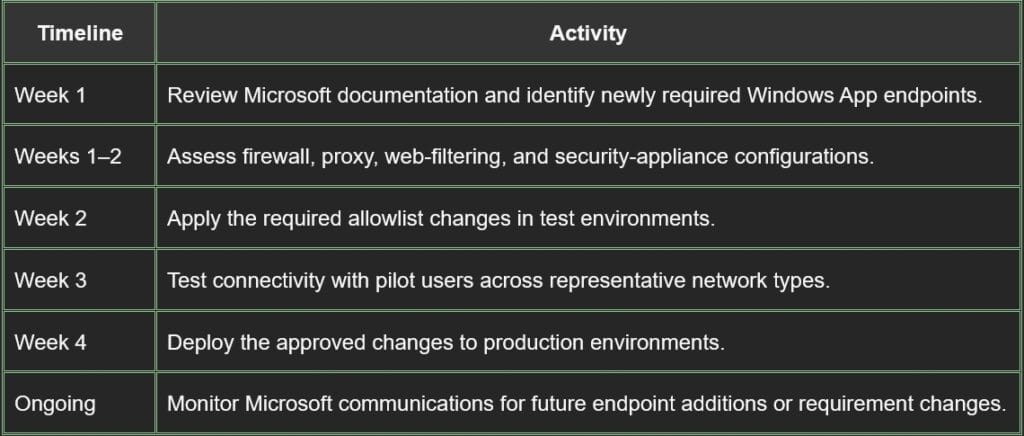
Suggested Timeline
Best Practices
To reduce future maintenance:
- Use Microsoft service tags where supported.
- Review the Windows 365 network-requirements documentation regularly.
- Avoid hardcoding IP addresses when Microsoft recommends FQDN-based allowlisting.
- Schedule recurring connectivity validation for Windows 365 services.
Business Impact
Windows 365 is an important platform for hybrid work, so client-side connectivity problems can affect productivity, remote access, and user satisfaction. Keeping network configurations current can help organizations maintain reliable Cloud PC access, reduce helpdesk incidents, improve the user experience, and prepare for future Windows App enhancements.
Conclusion
The introduction of additional Windows App client-side endpoints reinforces the need for regular Windows 365 network reviews. Organizations should update firewall and proxy policies, test connectivity across key user scenarios, and notify support teams in advance. Taking these steps early can help prevent service interruptions as Microsoft implements new connectivity requirements.
If you need more information and any implementation help on the above, our azure cloud services team is here to assist.