
Microsoft is continuing its effort to modernize and simplify Windows 365 administration by transitioning Windows 365 User Settings to a new settings framework. This change is designed to provide a more consistent management experience, improved scalability, and enhanced policy assignment capabilities for administrators.
Why This Change Matters
Windows 365 User Settings have traditionally allowed IT administrators to control key user experiences, including:
- Local administrator access on Cloud PCs.
- Cloud PC reset permissions.
- Restore service initiation rights.
- Cross-region disaster recovery settings.
These settings are currently managed through the Windows 365 User Settings policy experience in Microsoft Intune.
As Microsoft continues consolidating policy management experiences across Intune and Windows 365, user settings are being aligned with a newer framework that supports broader assignment capabilities and streamlined administration. This follows Microsoft’s ongoing strategy of simplifying configuration management and reducing dependency on legacy policy constructs.
What's Changing?
The new settings framework introduces a more flexible and standardized way to manage Windows 365 configurations. Administrators can expect:
Expanded Assignment Options: Rather than relying solely on specific assignment groups, supported settings will be able to target the following.
- All users.
- All devices.
- Specific groups.
This reduces administrative overhead and simplifies large-scale deployments.
Improved Policy Management: The updated framework aligns with Microsoft’s broader configuration management strategy, helping organizations manage policies through a more unified experience while improving reporting and policy consistency.
Future-Ready Architecture: By moving to the new framework, Microsoft can more rapidly introduce new Windows 365 capabilities without being constrained by legacy policy structures. Organizations adopting the new model will be better positioned to take advantage of upcoming features and enhancements.
Impact on Existing Deployments
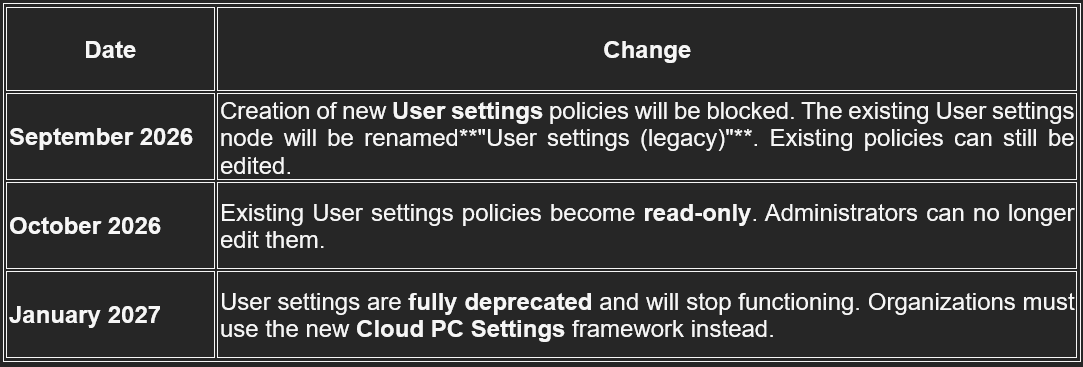
The transition is expected to be largely administrative and should not directly affect end-user productivity. Existing user settings will remain functional during the transition period, but organizations should:
- Review current Windows 365 User Settings policies.
- Monitor Microsoft Intune and Message Center communications.
- Test the new framework in a pilot environment.
- Update operational documentation and administrative procedures.
Microsoft has followed a similar approach with other Intune configuration technologies, where existing policies continue to work while administrators are encouraged to adopt the newer management model.
Timeline
Recommended Actions for IT Administrators
To ensure a smooth transition:
- Assess Current Configuration: Document all active Windows 365 User Settings policies and identify business-critical configurations.
- Review Assignments: Evaluate whether current group-based assignments can be simplified using the broader targeting capabilities offered by the new framework.
- Communicate Internally: Inform support teams and service desk personnel about the upcoming changes to avoid confusion when managing Cloud PC user permissions and settings.
- Validate in Testing: Before making production changes, validate policy behavior in a test tenant or pilot user group to confirm expected outcomes.
Benefits of the New Framework
Organizations can expect several advantages:
- Simplified administration.
- Consistent management experience across Microsoft Intune.
- Improved scalability for large environments.
- Enhanced policy targeting flexibility.
- Faster adoption of future Windows 365 innovations.
These improvements support Microsoft’s vision of delivering a more unified endpoint management platform across Windows 365, Intune, and Microsoft 365 services.
Final Thoughts
The transition of Windows 365 User Settings to the new settings framework represents another step toward a more streamlined and modern cloud PC management experience. While the impact on end users should be minimal, IT administrators should use this opportunity to review existing policies, simplify assignments, and prepare for future Windows 365 enhancements.
Organizations that proactively assess their current configurations and familiarize themselves with the new framework will be well-positioned to take advantage of Microsoft’s evolving Windows 365 management capabilities.
Feel free to connect with our Microsoft office 365 services team to schedule a consultation on the above or require support.