In November 2026 a Microsoft 365 outage left many firms around the world unable to rely on Outlook and shared calendars for many hours, including a full working day in Asia, and started a wide discussion about what the plan should be next time. This is our independent look at the realistic options, what each covers, what it costs to run, and the hurdles.
The short version
- No firm can fully avoid a Microsoft 365 outage. Microsoft already keeps several copies of every mailbox in separate datacentres. That protects against a failed server or building, not against a fault in the service itself.
- The real gap is new email, not old email. Staff with an offline copy of their mail could still read past messages, and files in SharePoint stayed reachable. What failed was getting new mail in and out.
- Plan for a day without email, not a week. Decide now what must keep working and who decides.
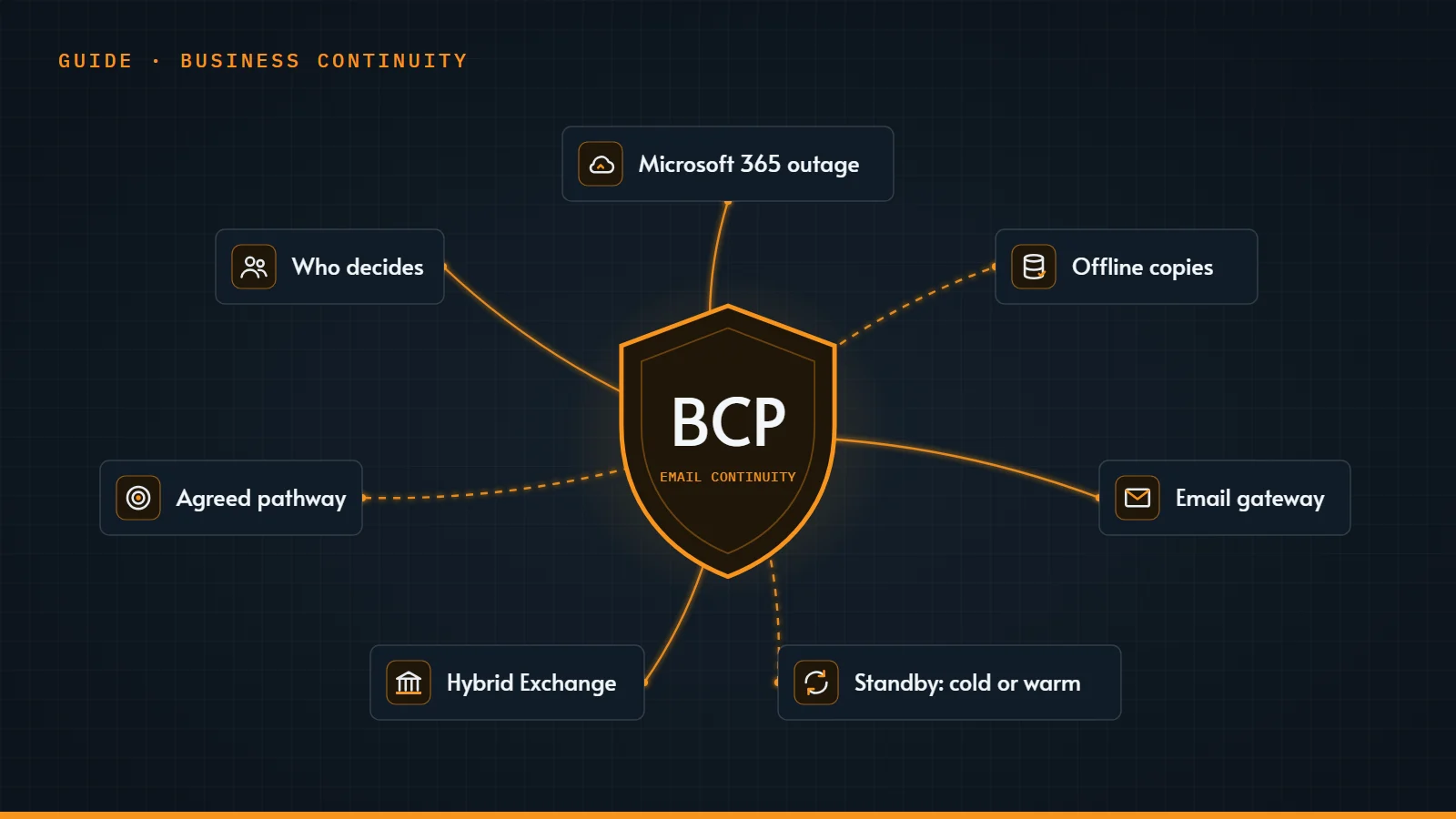
- Add a BCP (business continuity) solution for email only where the benefit is worth the cost and the extra risk, and your business and compliance needs require it.
What happened, and what kept working
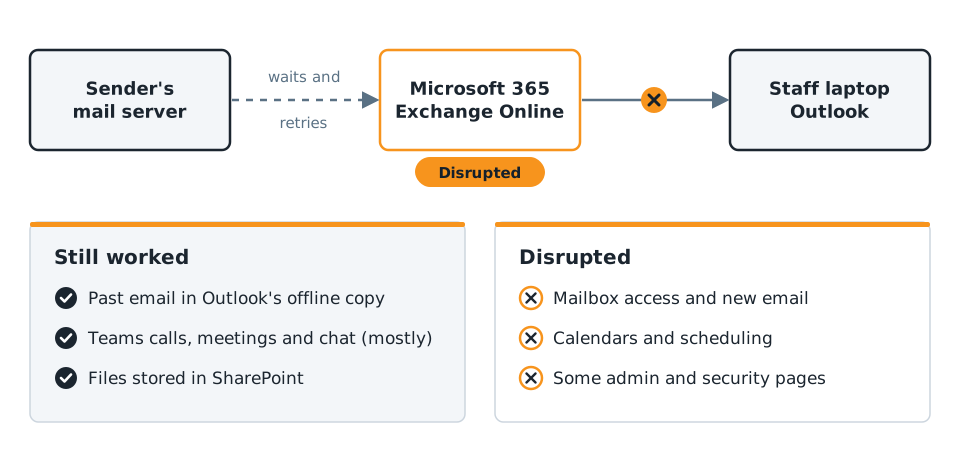
Microsoft's own status page said users might be unable to connect to multiple Microsoft 365 services. Features that interact with Exchange Online, the email service behind Outlook, were affected, while those that do not depend on it kept working. Mailbox access could fail in Outlook on the web, the desktop app and on phones, and email delivery could be delayed. Microsoft also listed Copilot Chat, some admin centre pages, and security and compliance tools such as quarantine, eDiscovery and audit searches. It said it was not aware of any malicious activity, and promised a post-incident report.
According to Microsoft, most core Teams features (calls, meetings, group chats and channel messages) were not affected, although Teams calendars and scheduling failed, and files stored in SharePoint remained accessible. Staff whose Outlook keeps an offline copy could also still read past email: classic Outlook keeps a local copy of the mailbox (12 months by default), and the new Outlook for Windows keeps 30 days by default and holds anything you send in the Outbox until the service returns.
That helped only staff whose devices keep an offline copy. People who work only online, in a browser or with Outlook's offline copy turned off, had little to fall back on. Some firms turn offline copies off on purpose, for security or data-handling reasons. That can be the right choice, but make it knowingly: it decides who can keep working in an outage.
Why the cloud's own resilience did not prevent it
Microsoft reported more than 450 million paid Microsoft 365 business seats in January 2026, so a single fault in the service can reach a very large number of firms at the same moment. Microsoft keeps at least three copies of every mailbox, normally in separate datacentres. That protects against hardware failures, not against a problem in the service all the copies share. The UK's National Cyber Security Centre notes that a service level agreement may give you a route to compensation, but it does not stop outages happening, and HKCERT's Hong Kong Cybersecurity Outlook 2026 lists over-reliance on a single cloud provider as one of the year's main risks.
Few firms will leave Microsoft 365 over one outage. The realistic goal is to be ready for a bad day.
The realistic options at a glance
One limit applies to every option. A BCP solution lets you send, but if your clients and suppliers are also on Microsoft 365, they cannot receive your email until their own service recovers. Your message waits in a queue, just like theirs.
| Option | What it keeps going | Running cost | Main hurdle |
|---|---|---|---|
| 1. Make the most of what you have | Past email, files, Teams, phone | Low | No new email |
| 2. Email gateway service outside Microsoft | New email through the gateway's webmail | Ongoing per-user fee | One more provider in your mail path every day |
| 3. Standby mail system, cold or warm | New email through a standby inbox | Cold lower, warm higher | Works only with an agreed, tested switch-over |
| 4. Own Exchange servers (hybrid) | Full mailboxes for those users | Highest | Mail still arrives through Microsoft unless rerouted |
Option 1: Make the most of what you already have
What it is: using the parts of Microsoft 365 and your laptops that keep working in an outage. This is the low-cost first step for every firm.
- Check that staff keep an offline copy of their mail (cached mode in classic Outlook, offline mode in new Outlook) and of key files (OneDrive's "Always keep on this device").
- Agree Teams as the fallback channel for internal messages, and phone for clients.
- Know where Microsoft posts updates: its public status page and @MSFT365Status on X, for when the admin centre will not load. Send incident alerts to an address outside Microsoft 365.
Hurdle: none of this lets you send or receive new email. It keeps people informed and productive while you wait.
Option 2: An email gateway service outside Microsoft
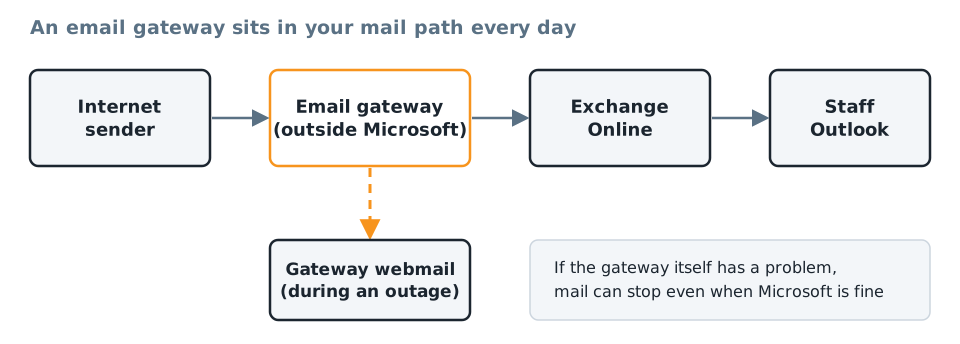
What it is: a security service that sits in front of Microsoft 365. Your MX record (the DNS entry that tells the world where to deliver your email) points to the gateway, which filters incoming mail and passes it on to Microsoft. Many gateways also offer a continuity feature: they keep a recent copy of your mail, and during an outage staff read and send email through the gateway's website or app.
The cost factor: gateways are usually charged per user per month, on top of your Microsoft 365 licences, and continuity is often an add-on or a higher tier. Ask for the total cost: licences, set-up, any minimum term, and the staff time to run and test it. Then weigh it against what a day without new email would cost your firm.
Hurdles to check before you buy:
- It is in your mail path every day. If the gateway has a problem, mail can stop even when Microsoft is fine.
- It covers email only. Calendars, Teams and files are not part of it.
- Sign-in must work when Microsoft does not. If staff sign in with their Microsoft account, that may fail during a wider outage, so separate credentials have to be issued and tested before the day.
- Check the details: some features depend on classic Outlook, and each service keeps a limited history and runs for a limited time per outage. Ask for the figures in writing.
- It can struggle too. During this outage at least one continuity provider's own status page reported intermittent errors caused by high demand.
- It is one more target. In the same week, the US Cybersecurity and Infrastructure Security Agency (CISA) listed two actively exploited flaws in a widely used email security appliance. Anything in your mail path needs patching and monitoring.
Option 3: A standby mail system, cold or warm
What it is: a separate mail system that your IT team or managed IT provider prepares in advance and uses only if an outage passes an agreed point. Day to day, your mail goes straight to Microsoft as usual, so the standby is not in your mail path and cannot hold it up. Because history is already on laptops, the standby only has to handle new mail.
It comes in two forms:
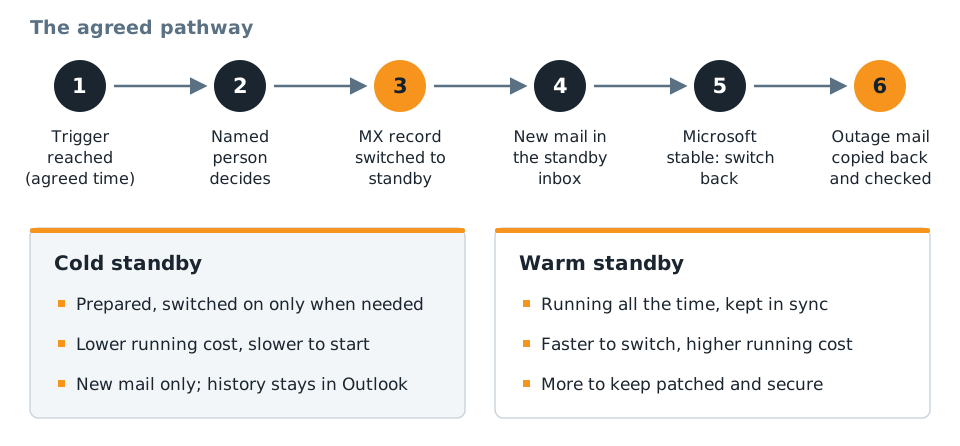
- Cold standby: accounts and DNS records are prepared, but the system is switched on only when needed. Staff get a clean inbox for new mail and keep reading their history in Outlook. It costs least to run, but takes longer to bring into use.
- Warm standby: the system runs all the time and is kept in step with your Microsoft 365 users, ready to take mail soon after the switch. It is faster, but costs more to run and is one more system to keep patched and secure.
Either way, it works only if everyone follows a pathway agreed in advance, written down and tested:
- Trigger: the outage is confirmed on Microsoft's status page and has lasted longer than the agreed time.
- Decision: a named person approves the switch, with a deputy.
- Switch: your MX record is pointed at the standby, and staff are told how to sign in.
- Work: new mail arrives in the standby inbox; history stays in Outlook.
- Return: once Microsoft is stable, the MX record is switched back.
- Copy back: mail from the outage is merged into everyone's normal mailbox and checked.
Hurdles:
- You must be able to change DNS quickly. Know who holds the login for your domain's DNS. If Microsoft manages your DNS, the admin centre you need may be down too (in this outage Microsoft reported that some admin centre pages might not load), so keep DNS with a separate provider.
- Changes are not instant. Microsoft's setup guidance gives the MX record a one-hour lifetime in other servers' caches, so some senders keep using the old route for a while unless a shorter time was set in advance.
- Your sender records must already list the standby. Microsoft's guidance is one SPF record that lists every service sending for your domain. Without that, and email signing (DKIM) for the standby, recipients may reject or junk your mail.
- Respect the trigger. Switching for a short delay splits mail across two systems and adds clean-up work.
- Cost and testing: set-up work, running costs (higher for warm), and a practice switch at least once a year. A full second email provider with complete mailboxes is the heaviest version of this idea: independent, but double the licences and administration.
Option 4: Keeping some mailboxes on your own Exchange servers (hybrid)
What it is: in a hybrid set-up, some mailboxes stay on an Exchange server that you run, in your office or a data centre, while the rest are in Exchange Online. Firms use it during a move to the cloud, or to keep particular mailboxes or applications on their own systems.
Why it seems to help: those mailboxes do not live in Exchange Online, so it is natural to expect them to keep working when Exchange Online stops.
The catch: Microsoft recommends pointing the MX record to Microsoft 365 in hybrid set-ups. All incoming mail, including mail for your own server, then arrives through Exchange Online first, so it stops when Exchange Online stops. Some set-ups also send outgoing mail through Microsoft 365.
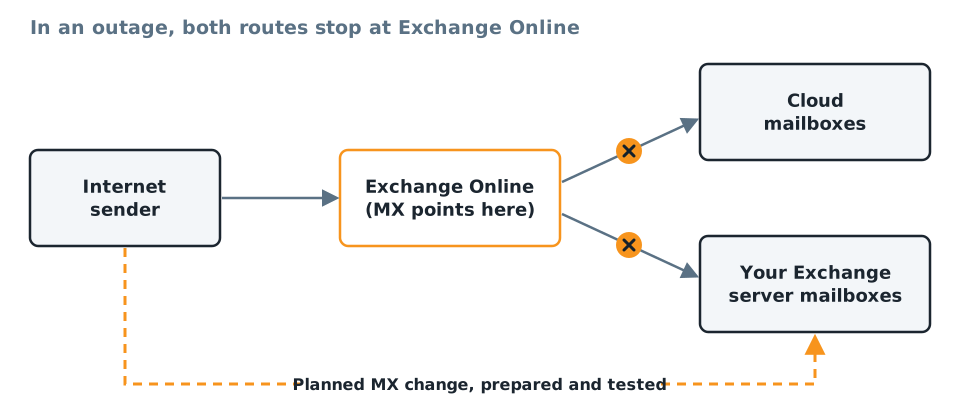
What it would take to keep those mailboxes working:
- connectors that let your server send mail directly, ready but unused day to day;
- sender records (SPF and DKIM) that already include your server;
- a planned MX change to your server, following the same agreed pathway as option 3;
- regular tests, and a plan for mail that arrives at Microsoft after it recovers.
The cost factor: you pay for the servers, licences, security updates and the expertise to run them. Exchange Server 2016 and 2019 reached the end of Microsoft support on 14 October 2025, so an older hybrid server is a risk of its own. Hybrid makes sense where a firm already runs Exchange for other reasons, rarely as a continuity measure on its own.
Do not forget the record-keeping question
When email stops, people reach for personal phones and messaging apps. For firms with record-keeping obligations, that is a new problem. Check your own policies now, decide which channels are approved for client communication during an outage, and tell staff before it happens. Plan too how mail handled by any BCP solution gets back into your records. In this outage Microsoft also reported problems with compliance tools such as eDiscovery and audit searches, so allow for that in your plan. Remind staff that outages attract scammers offering fake "IT support".
A one-page plan you can write this month
- List what must keep working for a day: client contact, payments, approvals. This is the business impact analysis NIST's contingency planning guide starts with.
- Name who decides that an outage is under way, when a BCP solution is switched on, and who tells staff and clients.
- Write down the fallback channels: Teams, phone, an SMS list and the approved apps.
- Keep an emergency admin account that does not depend on your normal sign-in, as the National Cyber Security Centre recommends, and test it.
- Check offline copies on every laptop: Outlook offline mail and key OneDrive folders.
- Check who can change your DNS records, how quickly, and that they do not depend on Microsoft 365.
- Choose your option for new email (a gateway, a cold or warm standby, or none for now) after weighing the cost and hurdles above.
- Test the plan in a short tabletop exercise once a year. Singapore's Cyber Security Agency recommends regular tabletop exercises for business continuity plans. Our guide to running a tabletop exercise shows how.
Frequently asked questions
Was email lost during the outage?
Microsoft described email delivery as delayed. When a receiving mail service is down, sending servers normally hold the message and retry. The email standard suggests they keep trying for at least four to five days, but each sender sets its own limit and some give up sooner, so a long outage can mean some messages bounce.
Does Microsoft's service level agreement cover our losses?
Do not count on it. As the UK's National Cyber Security Centre notes, a service level agreement may give you a route to compensation, but it will not prevent an outage. Check the remedies in your own agreement, and plan as if the outage will happen anyway.
Does every firm need an email BCP solution?
It depends on how much your business relies on new email arriving on time, and on your own compliance policies and client commitments. A firm that must keep receiving client instructions, confirmations or requests through a long outage, or that has committed to a tested continuity plan for email, has a strong case for one. For other firms, offline copies, Teams and phone fallbacks, and a clear plan for who decides may cover a day without email. Either way, weigh the hurdles: an email BCP solution needs DNS changes, separate sign-in, testing and clean-up, and recipients who are also on Microsoft 365 still cannot receive until their service returns. The right answer comes from a short review of your business and compliance needs, not a single yes or no for every firm.
What is the difference between a cold and a warm standby?
A cold standby is prepared but switched on only when needed, so it costs less but takes longer to bring into use. A warm standby runs all the time and is kept in step with your users, so it is faster to switch to but costs more to run and secure.
Sources and further reading
- Microsoft: Exchange Online data resiliency
- Microsoft: Email routing in Exchange hybrid deployments
- Microsoft: Connect your domain by adding DNS records and Domains FAQ
- Microsoft: How to check Microsoft 365 service health
- Microsoft: How to work offline in Outlook for Windows
- Microsoft: Earnings call, second quarter of fiscal year 2026 (paid Microsoft 365 business seats)
- UK National Cyber Security Centre: Using SaaS securely
- NIST: SP 800-34 Rev. 1, Contingency Planning Guide
Find the right email continuity option for your firm
There is no single right answer: the best option depends on how your firm uses email, your clients, your budget and your own policies. Our team can help you weigh the options and provide an email continuity solution based on your business needs, from a simple one-page plan to a standby system. See our Microsoft 365 services and IT consulting, or talk to our team.